The first version of the bot had some limitations which required a lot of
boilerplate to be written for each new shiny hunt to be implemented. Initially,
a shiny hunt was defined as a struct that implemented the HuntFSM trait. Each
new target had to implement all logic for getting an encounter and how to
detect if the encountered Pokémon was shiny or not.
This could have been improved by moving some of the logic to common functions, e.g. how to handle waiting for a specified duration. However, it would also be beneficial to allow sequences of states to be reused. For example, the sequence to Soft Reset the game and progress through the title sequence to load the game would be common for trying to hunt a gift pokemon or a static encounter with a legendary.
Reusable state machines
In order to allow writing reusable state machines, a shiny hunt was defined as a state machine that was composed of smaller fragments of states. Each fragment would advance to the next once completed.
For example, the static encounter Snorlax could consist of:
- Soft Resetting the game
- Using the Poké Flute to start the encounter
- Detecting if the Snorlax is shiny
Each fragment would use an enum to describe the possible states, and each state would contain the following information:
- The name of the state
- The outputs of that state, e.g. buttons to press
- A function to determine the next state
- Also the inputs to that function, e.g. which image processing to use
- A delay before advancing to the next state
pub struct StateDescription<K> {
    tag: K,
    inputs: Vec<Processing>,
    buttons: Vec<HuntStateOutput>,
    delay_msecs: Range<u64>,
    check: HashMap<K, BoxedProcessFn>,
}
As each fragment can use a different enum to describe the states, the final state machine will map each enum value to an integer, and this integer will be used to represent the current state and the target of any state transition.
The state machine is generic over what types are used for the inputs and outputs of the state machine, but currently only uses the definition of what image processing to do as the input, and which buttons to press as the output. Once the fragments have all been added to a builder, that builder will convert them into the generic form, recording which possible states can be reached from each input state.
Visualising the state machine
The state machine is now implemented in a generic way, with the states and transitions described as part of the struct. This allows the structure of the state machine to be retrieved programatically. This can be used to draw a graph of the state machine using graphviz.
Inkscape provides functionality to query the location of objects within an SVG which can allow highlighting the current state when the bot is running.
$ inkscape -I shaoooh_0,shaoooh_1 -X -Y -W -H graph.svg
154.136,81.5534
3.80583,31.8058
59.8058,72.3107
20.3884,20.3884
Random Encounter FSM
For random encounters, the easiest way to enter an encounter is to rotate the player rather than walking back and forth in the long grass. Moving would require detecting the location of the character in order to stay within the grass patch. Just rotating the character in a circle also causes problems as the direction of the character might not be known if some inputs to rotate were lost while entering an encounter.
In order to solve this, alternating encounter will switch between rotating up and down, and rotating left and right. In this way, the movement will never end up being in the same direction as the character is facing after an encounter and the player’s position will be maintained.
Detecting an encounter uses the screen going black, the white bar at the bottom of the screen during the start of an encounter, and the HP bar appearing. These can be timed to give an extra way of determining if a shiny is encountered.
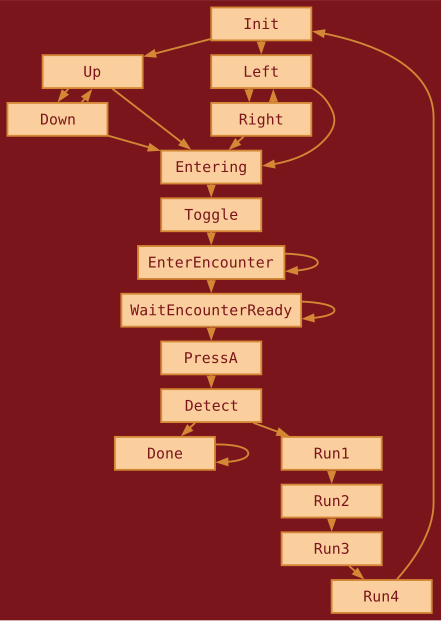
FireRed/LeafGreen Random Encounter
Soft Reset FSM
For a soft reset encounter, the sequence needs to include performing the soft reset and the sequence of actions to start an encounter. For example, for the static Snorlax encounter in Fire Red and Leaf Green.
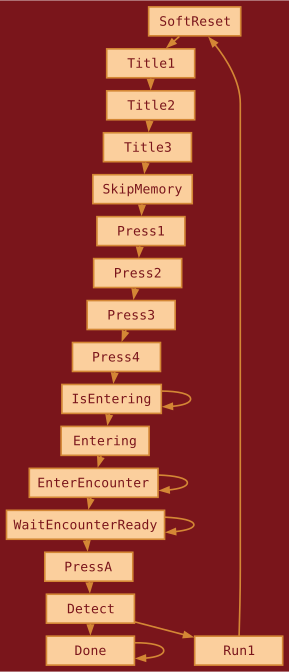
FireRed/LeafGreen Soft Reset
Computation
The state machines to perform each shiny hunt could also be viewed as simple programs. States/instructions could be used to do the following:
- Set an internal counter to a specific value
- Increment/decrement the internal counter
- Branch based on the internal counter value
- Jump to a specific state
- Start a timer
- Stop the timer
- Branch based on the elapsed timer duration
- Set an internal toggle
- Branch based on the internal toggle state
- Branch based on the result of image processing
- For example, based on which sprite is present
- A linear state that just progresses to the next
- A deadend state, for example after finding a shiny
More Complexity
These different states can be combined to perform more complex shiny hunts. For example, in Generation III and IV, a Dunsparce with a Hardy nature and ability Serene Grace is much more likely to be a Three Segmented Dudunsparce if evolved in later games.
The Synchronize ability can be used to increase the chances of an encounted Dunsparce having a Hardy nature, however this only works in Generation IV where Dunsparce is only available in swarms, or in Dark Cave at a 1% encounter rate. In order to improve these odds, it is also found 80% of the time with a rock smash encounter.
Soft resetting in front of the rock would lead to a long time between encounters, especially as it is not guaranteed to get an encounter when using rock smash. The probability of an encounter can be boosted, but this would conflict with using Synchronize to increase the chance of getting a Hardy nature.
The following pseudocode describes a program that can perform rock smash at two rocks before needing to soft reset and try again.
toggle = true
loop:
  if toggle:
    soft reset the game
    skip through the title sequence
  else:
    press B a few times (skip item dialog)
    move down, down, right
  perform rock smash
  if an encounter occurred:
    if shiny:
      done
    else:
      run away
This way, the first time through the loop it will soft reset and try to get an encounter, and the second time through it will perform the actions to skip any dialog if items were obtained instead and move to the second rock to try again.
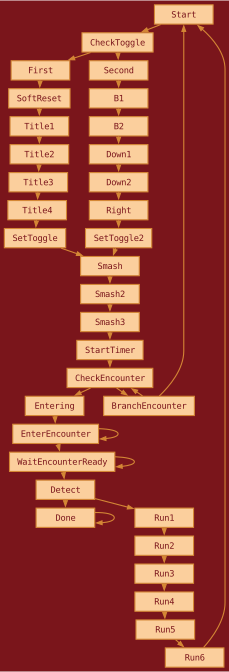
HeartGold/SoulSilver Dark Cave Dunsparce
Last modified on 2025-08-05